Understand your customer support at a glance

Clear dashboard to track team performance, channel effectiveness, and customer satisfaction

Customer satisfaction
94%
Customer satisfaction
Average response time
2.3m
Average response time
Active channels
03
Active channels

Comprehensive analytics dashboard for enhanced performance insights

Track chatbot success metrics

Chatbot performance

The chatbot performance report offers deep insights into user engagement, tracking key metrics such as the number of conversations, visitor count, customer satisfaction (CSAT), average conversation duration, and abandonment rates. These metrics help assess the efficiency of the chatbot, its ability to engage users, and areas for improvement. Use this data to optimize chatbot performance, enhance user experience, and increase engagement across all channels.
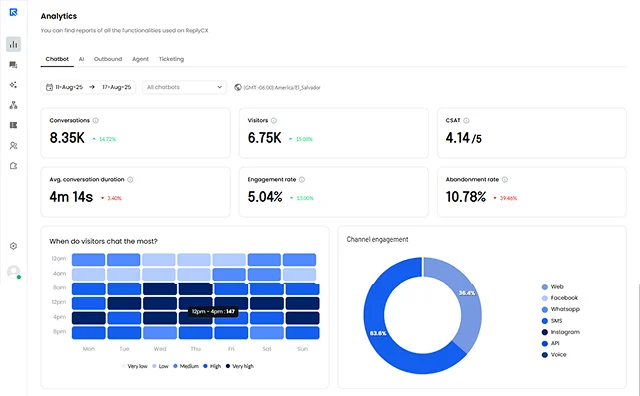
ReplyCX chatbot performance report

Evaluate AI agent effectiveness

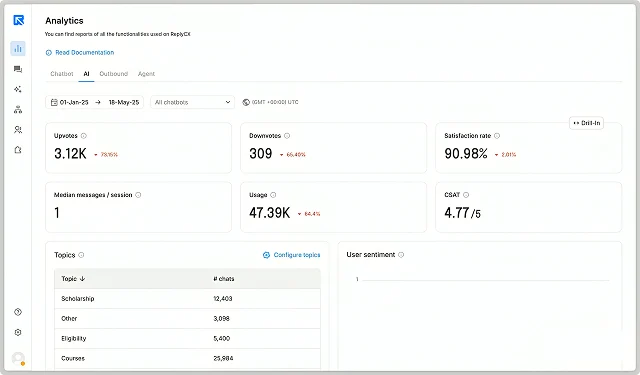
AI agent insights

The AI report provides valuable data on the performance of AI agents in real-time. Metrics such as upvotes and downvotes reflect customer feedback, while CSAT scores give an indication of user satisfaction with AI responses. The report also tracks AI credit usage, helping you monitor resource allocation. Understanding user interactions with AI agents allows you to fine-tune responses, improve training, and ensure more accurate and helpful assistance for users.

ReplyCX ai agent insights report

Measure human agent impact

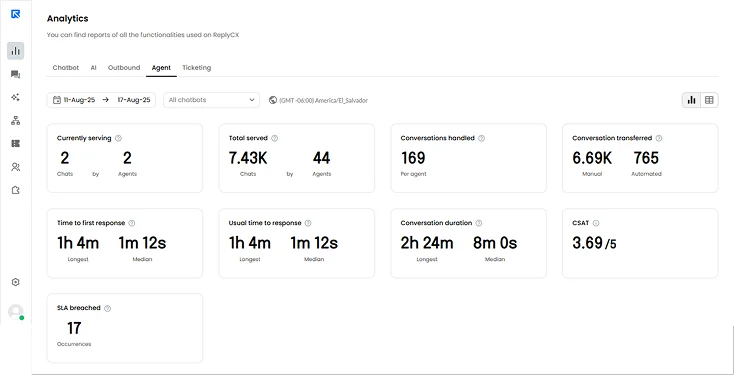
Agent performance overview

The agent report highlights the performance of human agents, showing real-time data on chats served, response times, and customer satisfaction (CSAT). It tracks the total number of conversations handled and time to first response, helping you identify potential bottlenecks or delays. With detailed insights on agent-level metrics, you can optimize staffing, improve training, and create a more efficient support process to enhance the customer experience.

ReplyCX agent performance overview report

Track satisfaction over time with clear mood indicators

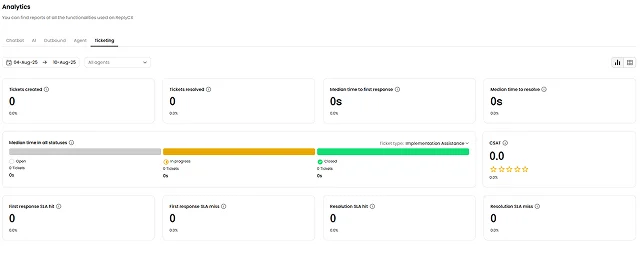
Ticketing analytics

The ticketing report provides a clear view of the entire ticket lifecycle, from creation to resolution. Metrics like median response and resolution times help pinpoint inefficiencies, while SLA compliance data tracks how well your team meets response targets. This report helps you identify areas for improvement, such as reducing response times or improving resolution quality, ultimately enhancing operational efficiency and customer satisfaction throughout the ticket management process.

ReplyCX ticketing analytics report

Key dashboard views

Unified dashboards that connect chatbot flows, AI agent feedback, human agent metrics and ticket lifecycles to revenue signals. Identify flow drop-offs that harm conversions, track AI upvotes/downvotes and credit use to limit escalations, and map median response/resolution times to churn risk and upsell opportunities, so teams prioritize playbooks that grow retention and lift ARR. Measure channel & campaign attribution.

  1. 01

    Automation coverage growth

  2. 02

    Chat vs email effectiveness

  3. 03

    Top performer recognition

Ready to see these features in your industry?

Get a personalized demo showing exactly how our platform works for ecommerce businesses.

Book e-commerce demo

Empower teams to focus on meaningful customer connections

Start your free trial now